Aral AI.
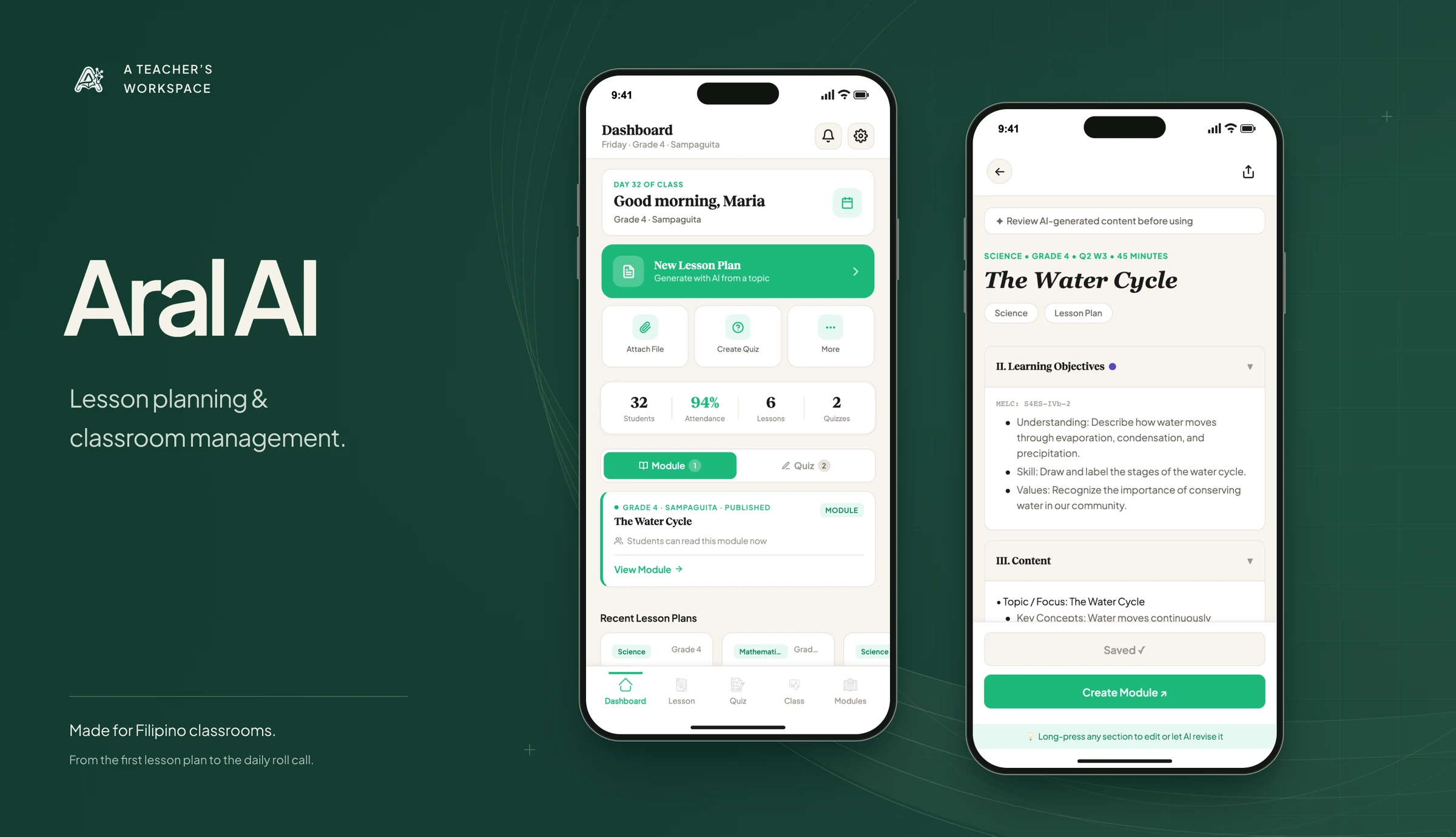
An AI-powered teaching and learning app for Filipino teachers and students. Teachers prepare learning materials and manage their classes, while students open lessons and complete activities, with or without a connection.
A problem worth exploring.
Teachers spend hours of every week writing lesson plans, modules, quizzes, and activity sheets, then keep their class lists and attendance somewhere else entirely. Many classrooms also have a connection that comes and goes. Aral AI gives teachers and their students one app for all of it, built to keep working when the signal drops.
Less friction. More intention.
Let AI write the first draft and leave the teacher in charge of it. A teacher starts from a topic, reviews and edits what comes back, and publishes it to the class. Every record is saved on the device first and synchronizes with the cloud once the app is connected. AI requests go through a server function, so the app can switch models without holding a provider key, and supported native builds can run a downloaded model on the device.
- AI-drafted lesson plans, modules, quizzes, and activity sheets, ready for a teacher to review.
- Class management with student lists, attendance, announcements, and progress tracking.
- A student side for published materials, quiz submissions, and an AI study assistant.
- Offline storage on the device that synchronizes with the cloud when connected.
Inside the build.
- Teacher & student appReact Native · Expo · TypeScript
- On-device recordsSQLite · Offline storage
- Connected servicesSupabase · Server-side AI requests
- Save on the device first
- Class records are written to local storage before they synchronize with the cloud. This makes offline access part of the data flow, while synchronization becomes a separate state the interface has to communicate.
- Keep teachers in control
- AI produces the first draft of a lesson, quiz, or activity. Teachers review and edit the material before publishing it to students.
- Keep provider access on the server
- Cloud AI requests pass through a server function. The app can change model providers without storing a provider key in the client. Supported native builds can also use a downloaded model.
Checks & walkthrough
The browser demo shows material creation and class-management screens. Device storage, synchronization, and downloaded models belong to the native implementation.
What the system enables.
- Before
- Teachers prepared learning materials and kept class records in separate tools, with an unreliable connection interrupting access.
- With Aral AI
- Teachers can draft, review, and publish materials alongside class records. The mobile app saves records on the device and syncs them when connected.
What this project taught me.
Offline-first changes every decision. Once a record is written to the device before it reaches the cloud, saving, syncing, and failing all become states a teacher has to see and trust. That shaped the app more than any single AI feature.
BUILT WITH
- Mobile app
- React Native, React, Expo, TypeScript
- Styling
- NativeWind, Tailwind CSS
- Navigation & state
- React Navigation, Zustand
- Backend
- Supabase Auth, PostgreSQL, Supabase Realtime, Deno Edge Functions
- On the device
- Expo SQLite, AsyncStorage
- AI
- OpenRouter, llama.rn, Qwen2.5 1.5B
- Quality checks
- GitHub Actions
HUGE
Every workout, meal, and milestone in one place.